
 Find Ge Monogram Repair Expert Near You
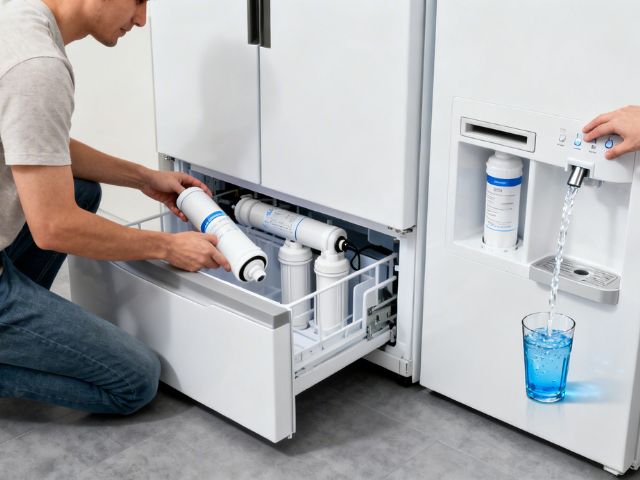
Clean, refreshing water and crystal-clear ice cubes aren’t luxuries—they’re expectations when you invest in a premium GE Profile refrigerator. Yet many homeowners overlook one critical maintenance task that directly impacts water quality, appliance performance, and even your family’s health: regularly changing the refrigerator water filter. If you’ve noticed your ice tasting slightly off or your water dispenser flowing slower than usual, your filter is likely crying out for replacement. Understanding how to change refrigerator water filter components in your GE Profile isn’t just about following instructions—it’s about protecting your investment and ensuring every glass of water meets the standards you deserve. This comprehensive guide walks you through the entire process with the clarity and confidence you need to complete this essential maintenance task successfully.
Why Your GE Profile Water Filter Matters More Than You Think
Your refrigerator’s water filter works tirelessly behind the scenes, removing contaminants, chlorine, sediment, and other impurities from your drinking water and ice. Over time, these trapped particles accumulate, reducing filtration effectiveness and potentially allowing contaminants back into your water supply. GE recommends replacing your Profile series filter every six months, though households with heavy usage or poor water quality may need more frequent changes. A clogged filter doesn’t just compromise water taste—it forces your refrigerator to work harder, potentially shortening its lifespan and increasing energy consumption. The filter change indicator light on your GE Profile serves as your appliance’s way of communicating that it’s time for this crucial maintenance step.
Identifying Your GE Profile Filter Type
Before starting the replacement process, you’ll need to identify which filter model your specific GE Profile refrigerator requires. GE Profile refrigerators typically use one of several filter types, with the most common being the RPWFE, RPWF, or MWF models. Your refrigerator’s user manual lists the correct filter model, but you can also find this information on a label inside your refrigerator or by checking the existing filter itself, which displays the model number on its housing. Different GE Profile configurations position filters in various locations—some install in the upper right interior corner, others in the base grille, and some models feature filters in the back lower section. Knowing your filter type and location before purchasing a replacement saves time and ensures you’re getting genuine GE parts designed specifically for your appliance’s filtration system.
Gathering Your Supplies
The beauty of this maintenance task lies in its simplicity—you won’t need a toolbox full of equipment. For most GE Profile models, the only item you absolutely need is the correct replacement filter. However, having a few additional supplies on hand makes the process smoother and cleaner. Keep a towel or small bucket nearby to catch any residual water that might drip when you remove the old filter. Some homeowners also appreciate having a flashlight available for better visibility inside the refrigerator compartment. If your model has a base grille filter location, you might find it helpful to have a small step stool for easier access. Wearing disposable gloves is optional but can keep your hands clean when handling the old filter, which may have accumulated sediment and particles.
Step-by-Step Filter Replacement Process
For Interior-Mounted Filters:
- Locate the filter housing in the upper right section of your fresh food compartment.
- Identify the release button or twist-lock mechanism on your specific GE Profile model.
- Press the release button or turn the filter counterclockwise approximately a quarter turn until it releases from the housing.
- Pull the old filter straight out, keeping it upright to minimize water spillage.
- Remove all packaging materials and protective caps from the new filter—leaving these on prevents proper water flow.
- Align the new filter with the housing, ensuring any arrows or alignment marks match up correctly.
- Push the filter firmly into place until you feel it lock, or turn it clockwise until it stops if your model uses a twist-lock design.
For Base Grille Installations:
- Remove the base grille by pulling it forward from the bottom of the refrigerator.
- Locate the filter cap and turn it counterclockwise to release.
- Pull out the old filter carefully to avoid spilling residual water.
- Insert the new filter into the housing, ensuring proper alignment.
- Secure the cap by turning it clockwise until it’s firmly in place.
- Replace the base grille by snapping it back into position.
Priming Your New Filter and Resetting the Indicator
After installation, your new filter requires priming to remove air pockets and activate the filtration media. Run approximately two gallons of water through your dispenser, discarding this initial flow. You’ll notice the water may appear cloudy at first—this is completely normal and results from air bubbles and carbon fines being flushed from the new filter. Continue dispensing until the water runs clear and any black specks disappear. This priming process also ensures proper water pressure and flow rate. Once you’ve completed priming, reset your filter change indicator light to restart the six-month countdown. On most GE Profile models, you’ll hold down the “Reset Filter” or “Water Filter” button for approximately three seconds until the light changes color or turns off. Consult your owner’s manual for the specific reset procedure for your model, as button combinations vary across the Profile series.
Recognizing When Early Replacement Is Necessary
While the standard six-month replacement schedule works for most households, certain circumstances demand earlier filter changes. If you notice a significant decrease in water flow rate from your dispenser, this typically indicates filter clogging and reduced filtration capacity. Changes in water taste, odor, or appearance—even if subtle—suggest your filter has reached capacity and can no longer effectively remove contaminants. Households using well water or living in areas with known water quality issues should consider quarterly replacements rather than the standard six-month interval. Similarly, larger families or those who frequently use the water and ice dispensers may deplete filter capacity faster than average. Your GE Profile’s filter indicator light uses volume-based calculations, but it can’t account for water quality variations, so trust your senses and replace the filter whenever you notice performance changes.
Avoiding Common Filter Replacement Mistakes
Even straightforward maintenance tasks have potential pitfalls. Never attempt to extend filter life beyond recommended intervals by rinsing or cleaning the old filter—these cartridges are designed as single-use items, and attempted cleaning can actually introduce bacteria or release trapped contaminants. Always purchase genuine GE filters or certified compatible filters that meet NSF/ANSI standards. Counterfeit or incompatible filters may fit your refrigerator but fail to provide adequate filtration, potentially voiding your appliance warranty. Some homeowners forget to remove the protective caps from new filters before installation, resulting in no water flow and unnecessary service calls. Others skip the priming process, leading to cloudy water and complaints about filter performance. Taking a few extra minutes to complete each step properly ensures optimal filtration and appliance performance.
Final Thoughts
Mastering how to change refrigerator water filter components in your GE Profile refrigerator empowers you to maintain your appliance’s peak performance and protect your family’s health with minimal effort and expense. This simple ten-minute task delivers significant returns—better-tasting water and ice, improved appliance efficiency, and peace of mind knowing you’re removing contaminants from every glass. By following the straightforward steps outlined above and adhering to the recommended replacement schedule, you’ll ensure your GE Profile continues delivering the premium performance you expect. Regular filter maintenance represents one of the easiest yet most impactful ways to care for your appliance investment while safeguarding water quality throughout your home. Remember that knowing how to change refrigerator water filter properly isn’t just about the mechanics—it’s about taking control of your home’s water quality and your appliance’s longevity.
Keep Your Entire GE Profile Kitchen Running Flawlessly
Trust the Experts at GE Monogram Repair Expert
While changing your water filter is a simple DIY task, some appliance maintenance and repairs require professional expertise. At GE Monogram Repair Expert, our certified technicians specialize in keeping your premium GE appliances operating at peak performance. From refrigerator compressor issues to complex electronic diagnostics, we deliver reliable, manufacturer-approved service you can trust. Don’t wait until a minor issue becomes a major problem—schedule your preventive maintenance appointment today and experience the difference professional care makes.
Frequently Asked Questions
How often should I really change my GE Profile refrigerator water filter? Replace your filter every six months under normal usage conditions, or sooner if you notice decreased water flow, taste changes, or if your household uses water heavily. The indicator light provides a helpful reminder, but always trust performance changes over the timer alone.
Can I use third-party filters instead of genuine GE filters in my Profile refrigerator? While some certified third-party filters meet NSF/ANSI standards and work properly, always verify compatibility and certification before purchasing. Genuine GE filters guarantee proper fit, performance, and warranty protection, making them the safest choice for your investment.
What does it mean if water is cloudy after installing a new filter? Cloudy water after filter installation is completely normal and results from air bubbles and harmless carbon fines being flushed from the new filter. Continue dispensing water until it runs clear, typically after two gallons, and the issue will resolve completely.
Just as regular filter changes keep your water clean and fresh, proper appliance maintenance ensures optimal performance during your busiest times. Check out our previous blog, Why Holiday Meals Need a Pre-Holiday GE Profile Oven Tune-Up, to discover how preventive care can save your celebrations from unexpected appliance failures.